Class Hours: 10:05 – 2:40
Mr. Bohmann | wbohmann@ewsd.org
10:05 Today’s Notes & Attendance
Wacky Wednesday
- Halloween Projection Loops next Wednesday
- A representative from Vermont State University (all campuses) will be here today! from 11:00 – 12:00 in the CTE Conference Room
- Download and Install SABER when you read this
- No School tomorrow or Friday
10:10 After Effects – Object Matte / RotoScoping

Rotoscoping sounds like some unfortunate experience at the dentist. I promise it is not that bad, at all. In fact, in After Effects it is now called Object Matte Tool, now doesn’t that sound better?
Rotoscoping is simply masking out something in your shot that just doesn’t belong. Simply put, rotoscoping is selecting moving footage over time and blocking it out.
direct from Adobe….
Rotoscope animation describes the process of creating animated sequences by tracing over live-action footage frame by frame. Though it can be time consuming, rotoscoping allows animators to create lifelike characters who move just like people in the real world.
The technique of rotoscoping also made the lightsaber possible.
To create these visual effects in the original Star Wars films, animators drew the color and glow of each lightsaber over the sticks the actors held on every frame in which they appeared.
In After Effects, there is a very powerful tool – the RotoBrush – now called Object Matte Brush
We’ll be working out of public folders and using these files.
- Dwight
- Surf
- Urban Dancer
- Sand Dunes
ObjectMatte/ Roto Process (how to) for your files. Make a copy for your own reference.
We can use AE with Premiere in very easy ways. Let’s adjust our workflow slightly for this. We’ll start in Premiere and dynamically link to After Effects. If you see the workflow, After Effects usage in your production work is less intimidating.
10:50 Morning Break (10 minutes)
11:00 Intro to Motion Tracking
Motion Tracking is the concept of following objects in footage so that you can add new objects to that scene and create a interesting and believable composition.
The process consists of automatically locating a point or a series of points from a frame to frame to frame sequence
Motion tracking makes visual sequences waaaay more interesting!
Motion Tracking methods may include:
- Single Point Tracking – which tracks X and Y coordinates
- Two Point Tracking for when you want to include rotation and scale
- Mask Tracking (also called Rotoscoping) to isolate masks in a shot
- Camera Tracking – follows the action and coordinates of the camera in three dimensional space
- Planar Tracking – following a surface or sign that you want to replace.
Tracker Features
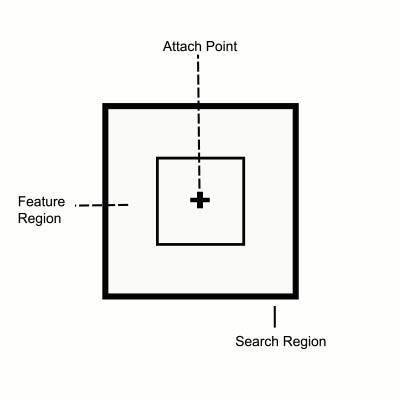
The tracker is made up of two boxes and an attach point.
The outside box is called the search region and defines what type of data to search for.
The inside box is called the feature region and it looks for the features that are similar to the attach point
You can expand and contract both of those boxes to try for the best tracking
Auto tracking is handled by After Effects. To get a good track, keep in mind:
- Start with high quality footage
- Good contrast is important
- Work in full resolution
11:35 Lunch
12:05 Speed Design

12:20 Independent Production Time / VHV / Sweatshirts
- Light week this week – one assignment: Lower Thirds. See Google Classroom for details. – Assignment is due on Monday
- Halloween Projection Loop – Due October 28th
1:00pm Break (15 minutes)
1:15 Dailies
1:15 Independent Reading

1:45 Dismissal