Class hours: 10:05 – 2:45
Mr. Bohmann | wbohmann@ewsd.org
10:05 Today’s Notes & Attendance
- Welcome to April and Spring?
- SLC meeting is scheduled for today at 11:30
- After lunch – let’s watch all of the VHSA Videos as not all were seen by the group – everyone deserves a hand for their work
10:10 Unity Terrain
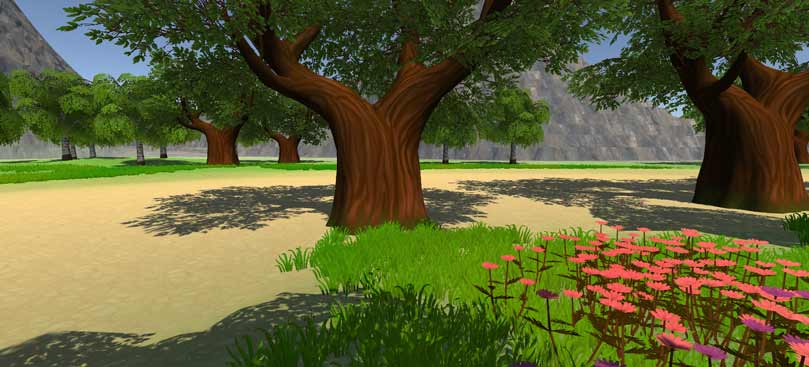
If you want to build a landscape and environment in Unity, it is pretty easy to do. Without doing anything in the editor, Unity has some terrain tools available. An expanded set of tools are available in the Unity Registry. Let’s look at the adding packages from the package manager and get a look at built in assests, the Unity Registry – which is basically a host of add on applications that ships with Unity but need to be enabled and the asset store. Any thoughts on why Unity does not enable these with a new project?
Why build Terrain?
- Rapid prototyping
- Terrain objects are Unity game objects so you can add colliders, lighting, etc…
- Creates more dynamic levels
- Simulate terrain effects like bridges, terraces, wind and thermal erosion, heightmaps, holes
Unity’s Asset store is full of content that can be used for game development, game prototyping, architectural renderings and animations and visual effects.
Let’s look at how the terrain system in Unity works and build out a scene together. There are a lot of great assets you may like to explore and import.
Remember, you don’t have to include an entire asset library. During the import process you can pick and choose. Here are some that you might find enjoyable….
- LowPoly – Medieval Fantasy Series
- Unity Starter Assets for these to work we’ll also need Cinemachine
- Fantasy Landscapes
- Aquas Lite
- Handpainted Grass and Ground Textures
- Grass Flower Pack by ALP8310
- Conifers BOTD or the other new one that comes up when you search Conifers
- Coconut Palm Tree Pack
- Outdoor Ground Textures
- Nature Starter Kit 2
- Rocky Hills Environment Light
- Sun Temple by Sandro T
- Flooded Grounds by Sandro T
- Modular First Person Controller by JECASE – so you can run around (disable main camera)
Our Goals today are:
- Add foliage and details
- Activate the terrain tools
- Add on the some sample assets (Low poly and starter)
- Create a custom terrain
- Raise and lower terrain height
- Paint terrain details
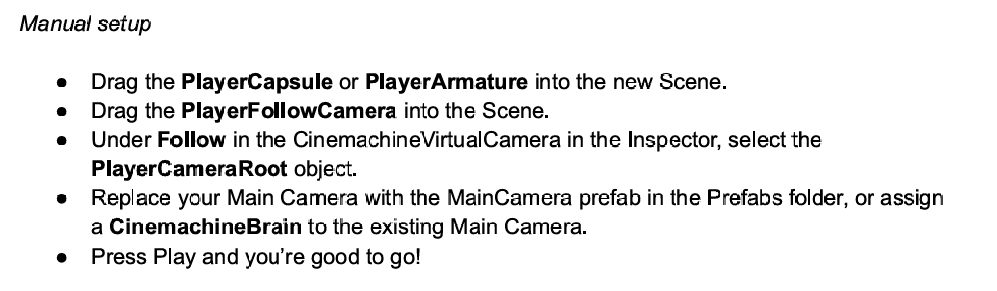
Getting a Player in the Scene – We’ll use the Standard Assets Package and Cinemachine. Both need to be added. Then…
10:50 Break

11:00 Pinball – what’s next…
We are at the 3/4 mark with our pinball games. They are not incredible to look at but we do have a cool controller, sounds, score and a theme. Probably need to consider a few more items before we put it away as a sample project to practice coding and design. One thing for sure, it’s challenging to do all of it.
Intrinsically we want the game to look beautiful, but we know that is difficult – and we change our minds a lot! So what’s left (of the basics)
- Health or lives
- Game Over / Restart
- Start Screen
- Publishing
Code we can use in our Game Manager for managing lives (plays)
//add to variables
public int lives = 3;
public PinBallLauncher launcher;  //get reference to your ball launch script

public void LoseBall()
{
    lives = lives - 1;
    if(lives > 0)
    {
        launcher.ResetBall();
    }
    else
    {
        Debug.Log("Game Over!");
        Destroy(launcher.gameObject); launcher = null;
    }
}
Code on our Killbox
public PinBallLauncher launcher;
private void OnTriggerEnter2D(Collider2D collision)
{
    if (collision.CompareTag("Ball"))
    {

        GameManager.gmInstance.LoseBall();

        launcher.ResetBall();
    }
}
11:35 Lunch

12:05 VHSA Watch Session & Unity Terrain Practice
Celebrate VHSA videos and do some more Terrain Practice while learning more about the Unity Store.
1:00 Afternoon Break (15 minutes)
1:15 Dailies

1:20 Independent Reading
