Class Hours: 10:05 – 2:40
Mr. Bohmann | wbohmann@ewsd.org
10:05 Today’s Notes & Attendance

Wacky Wednesday
- CCV Class Friday – Lunch order on yesterday’s dayplan
- We have an assembly today at 12:45pm – You will leave directly from the Assembly
- T-shirt distribution
- Joshua – you are excused at lunch to go to 117 to meet with Ms. Wilson. Your group is going to do a rehearsal. Grab your lunch and take it to her room.
- Canon Manual Mode Resource
10:10 Manual Mode – Be the Boss of your camera
The three main pillars of photography are Aperture, Shutter Speed and ISO
The goal with every image is proper exposure and focus (composition is a close third)

Manual Mode shooting on your camera allows you to have control over the entire camera. This means that when you prepare to take a photo, you get to decide:
- focal length
- Aperture
- shutter speed
- exposure
That’s a lot to think about and you will get confused! I can tell you from experience, this is a pile of information to think about.
A handy tool to help you get the correct exposure is the Light Meter.
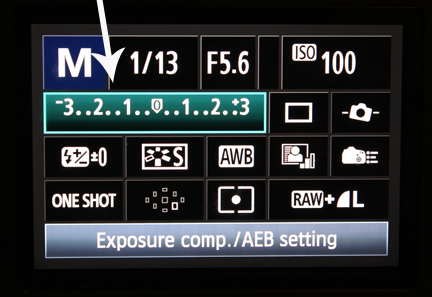
Exposure is determined by two things
- The amount of light in the scene.
- The speed of your sensor ISO
Exposure is controlled by two things:
- Shutter Speed
- Aperture (f-stop)
Activity – Manual Mode Scavenger Hunt
- Take a picture of a book in the library (blurred background) (shallow depth of field)
- Take a picture where you want objects from foreground to background in focus (long depth of field)
- Take a picture of the front of the school (Essex High School)
- Take a picture of some action / movement (student walking) you do not need permission where you blur or stop action
- Take a picture of an object in the classroom
- Take a picture of something from an unusual angle
- *All images should be in focus / properly exposed!
When done:
- Open and view your images in Adobe Bridge.
- Clean up any photos you need to and edit as necessary using Camera Raw or Photoshop.
- Create a Contact Sheet with all of your photos.
To Create a contact sheet in Bridge: Go to the Output view, Under Template, select Custom, then set up as 2 columns x 3 rows (under Grids and Margins) Drag your images to the contact sheet. When done, Export to PDF. Do look at all the settings you can play with.
Filename: FirstName.Lastname_ScavengerHunt.PDF
We’ll look at your contact sheets today – they are due today! You will place them in dailies
10:50 Morning Break (10 minutes)

11:00 Fundamental Programming with C# & Unity

Let’s play around a bit with what we made last week. We’ll add some new script and some conditionals. For your reference:
using UnityEngine;

public class Rotate : MonoBehaviour
{
    public int rotationSpeed;
    private Renderer objectRenderer;

    void Start()
    {
        objectRenderer = GetComponent<Renderer>();
    }


    void Update()
    {
        transform.Rotate(0, rotationSpeed*Time.deltaTime, 0);
    }


    private void OnCollisionEnter(Collision collision)
    {
        if (collision.gameObject.CompareTag("Player"))
        {
            objectRenderer.material.color = Random.ColorHSV();
        }
    }
}
11:35 Lunch

12:05 Work Session
This will be a work session to great sweatshirt designs ready for preview tomorrow as well as finishing up the work on your digital logos or tackling your week four agency. Seek help if you need some. We’ll be leaving the for the assembly about 12:35 today. You will need to grab all your items as we’ll leave from there.
Yes, you do have to wear your t-shirts.
12:35 Leave for Assembly
12:45 CTE Assembly
1:45 Dismissal