Class Hours: 10:05 – 2:40
Mr. Bohmann | wbohmann@ewsd.org
10:05 Today’s Notes & Attendance

Wacky Wednesday
- Open House Tonight – 5:30 – 7pm – Stop by
- Polygon Art using Illustrator assignment due today
- CCV Friday
- SLC Meeting today – Joshua 11:35am
- Amazon flair – send me your links so I can get an order in place

10:10 Quick Scrum Meeting – sweatshirt updates from the group
10:10 Aperture

Last week you learned through practice that the easiest approach to abstract photography is the close up shot. Close-ups remove the context of what is in the viewfinder as well as emphasizes the texture and graphic elements.
We also talked about Focal Length briefly…
Focal Length is the space from the camera sensor to the lens. This measurement is measured in millimeters.
- Wide Lens – 35mm
- Normal Lens – 50mm
- Telephoto Lens – 75-300mm
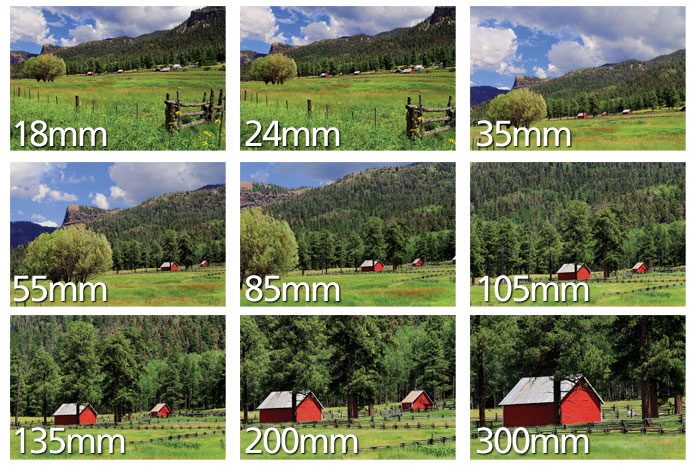
Focal Length is measured in Millimeters and it represents the distance from the center of the camera’s lens to the sensor of the camera body. The longer the distance, the longer the lens, and the longer the zoom.
Why does the Focal Length Matter? Well, focal length will help you:
- Determine your Field of View. When you change the focal length, the field of view will change. More or less will show in the viewfinder. Look at the image above for an example
- Perspective – Objects behind an image will be compressed with longer focal length
- Depth of Field is affected by focal length
- shallow DOF – small or narrow area is in focus
- long DOF – more in focus
Aperture
To control focal length, let’s learn about Aperture Priority mode.
Aperture is the space through which light passes into the camera. The smaller the hole, the less light. The larger the whole, the more light.
Your Camera has an Aperture Priority Mode! Turn your camera to the AV dial.
Remember, in Aperture Priority mode, you have control over the Focal Length which is referred to as the lense field of view. Cheat Sheet
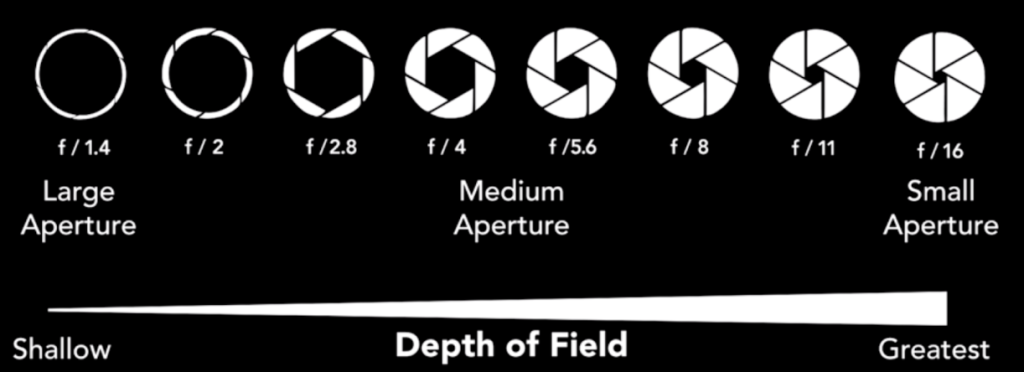
A small f-stop number (f2) means a shallow depth of field (blurred background) and large f-stop number (f22) means a large depth of field (more in focus behind the subject)
Can you think of some shooting scenarios where you would want to adjust the aperture?
Activity: Confused Yet? Let’s go outside and practice.
Set your camera up in AV Mode.
Set up the focal length of your lens to 35mm. Do not adjust.
Set up your camera to manual focus
Using the Bracketing technique (new word), find a subject and attempt to blur the background while keeping your main subject in focus. Start at your smallest f/stop and work your way to the largest f/stop.
We’ll come in and browse in Bridge and see the results.
10:50 Morning Break (10 minutes)

11:00 Fundamental Programming with C# & Unity

Each Wednesday we’ll do a little programming to get more familiar with the Unity interface and help each of you get more comfortable with game programming. This practice will translate well when we get to SkillsUSA work and our full game unit next semester. I promise to keep the coding manageable!
Let’s look through our development environment, Unity, Asset Store and some basic programming. No heavy lifting today. We’ll also look some variable basics like bool, int, string and float.
All of our Game Objects have data attached to them. The Transform of a gameObject has 9 pieces of primitive data – like location of x, rotation of z and scale, etc….
We can store information about game object values to calculate health, score points, among other game play options. Each value can be stored in a uniquely named storage area called a variable.
A variable is defined with a specific data type (such as int or float) and a name such as myScore or player1Health. You can change the variable’s contents while the program is running – that’s why it’s called a “variable”. We used lots of variables to store data.
Public variables are accessible from game play and from other scripts. Private variables, which is the default for variables are available only for that script.
[SerializeField] is a private variable type but is available from game play to adjust while testing. More on this later.
public class MyScript : MonoBehaviour {

   int score;               // declare an int called Score
   float currentDirection;  // declare the float currentDirection
   char myInitial;          // declare a char called myInitial
   string userName;         // declare a string called userName
   bool isMoving;           // declare a bool called isMoving

   void Start () {

      //  numeric data types do not require quotes
      score = 8;

      // use the "F" suffix to specify a float value
      currentDirection = 90.2F;

      // use single quotes around individual characters
      myInitial = 'A';

      // use double quotes around groups of characters
      userName = "Will Bohmann";

      // boolean values are either true or false
      isMoving = true;
   }
}
Variable Scope refers to where you place your variables. If you placed your variable in the Start method, it will run when the game begins and then not be accessible again.
For our final task today, we’ll write a little code that makes an object move. We’ll use variables to do it.
11:35 Lunch

12:05 Unity Continued…
Earlier we looked at variables – specifically int which are whole numbers, float which are decimals and string which are for words, phrases etc…
We also learned that variable scope refers to where you place your variables. If you placed your variable in the Start method, it will run when the game begins and then not be accessible again. If you place your variables at the top of your code, they are available across methods and functions.
Public variables are accessible from game play and from other scripts. Private variables, which is the default for variables are available only for that script.
[SerializeField] is a private variable type but is available from game play to adjust while testing
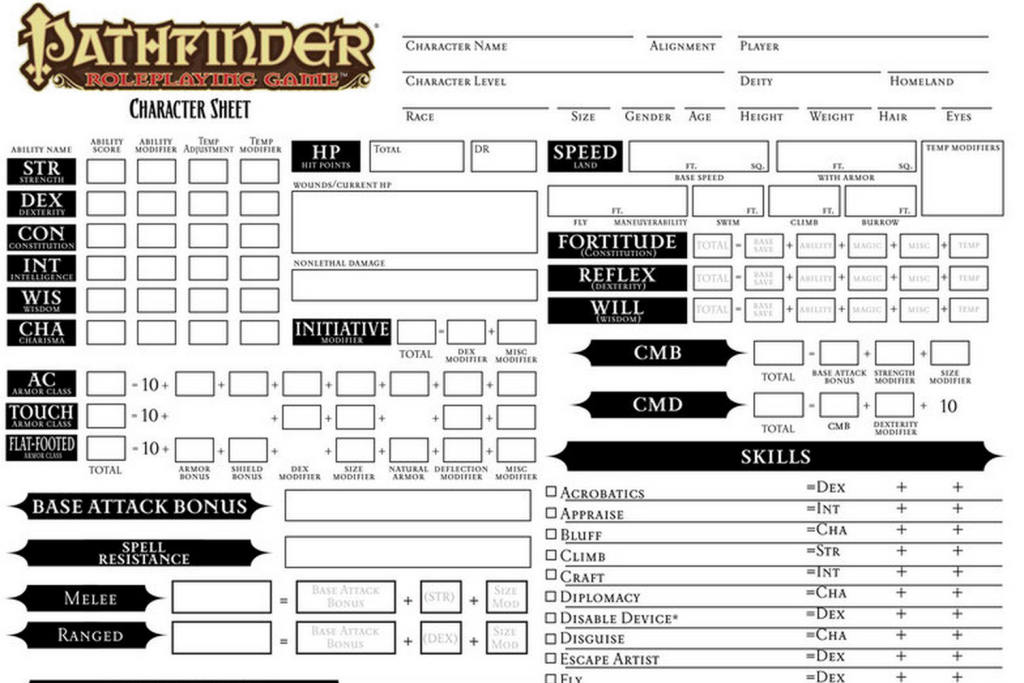
Check out all the variables in the gameboard above!
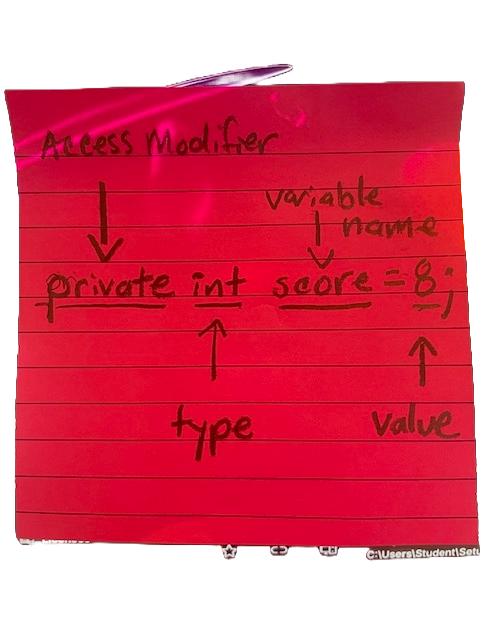
We already know that we use variables to provide more code flexibility. In many cases we may want to store mathematical operations in a variable. Let’s look at some common math operations.
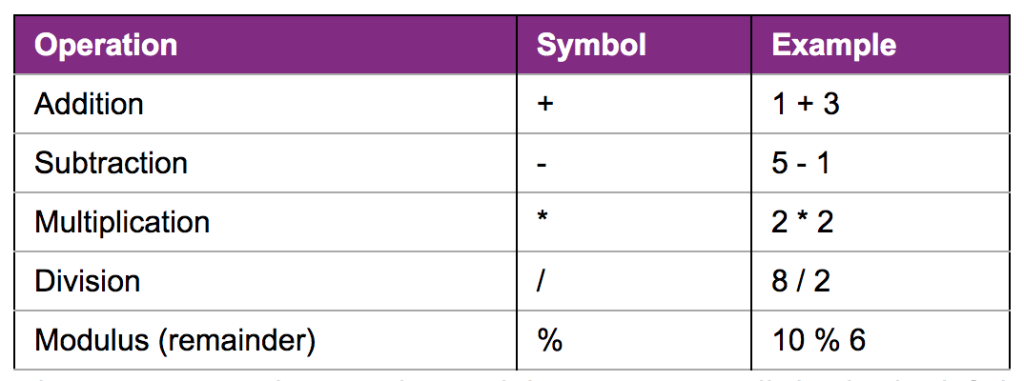
int added = 3 + 4;          // added is 7
int subtracted = 3 - 4;     // subtracted is -1
int multiplied = 3 * 4;     // multiplied is 12
int divided = 12 / 4;       // divided is 3
int remainder = 12 % 5;     // remainder is 2
12:45 Independent Production Block
Current Assignments:
- Agency for Week 2 is now assigned – Due Monday, September 14th
- Isolation of Color Photography Assignment – Due Monday, September 14th
1:00 Afternoon Break
1:15 Dailies

1:15 Independent Reading

1:45 Dismissal