Class Hours: 10:05 – 2:40
Mr. Bohmann | wbohmann@ewsd.org
10:05 Today’s Notes & Attendance
- Today is President’s Day
- Today is the start of your last week before vacation
- Today is the beginning of Week 22
- MidPoint of q3 has come and gone. Q3 officially ends on March 27th
- Any work assigned this week will not be due until after break – so use this week to get caught up and ahead.
- Focus on finishing your PSA modeling and messaging
- Want a Golden Ticket? Be 100% complete by Friday at Noon!
10:10 Monday Mail Check

10:12 Working in 2D Continued…
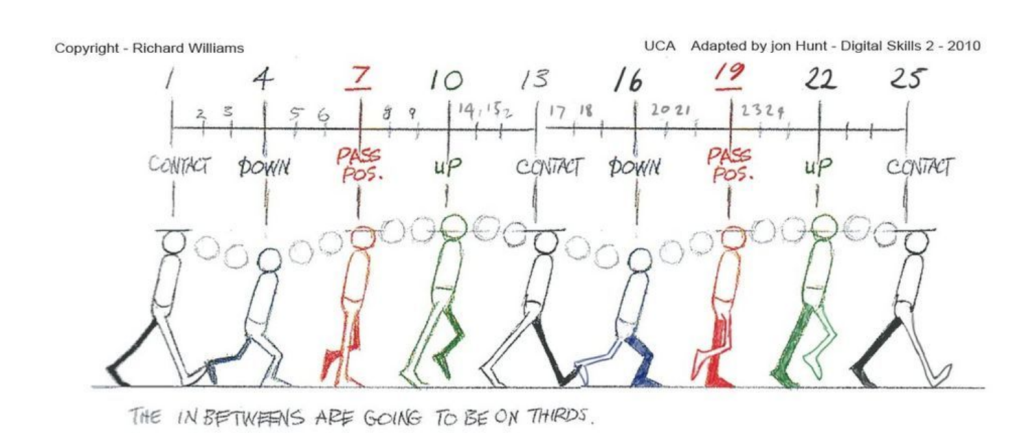
A Walk cycle at 24 Frames per Second
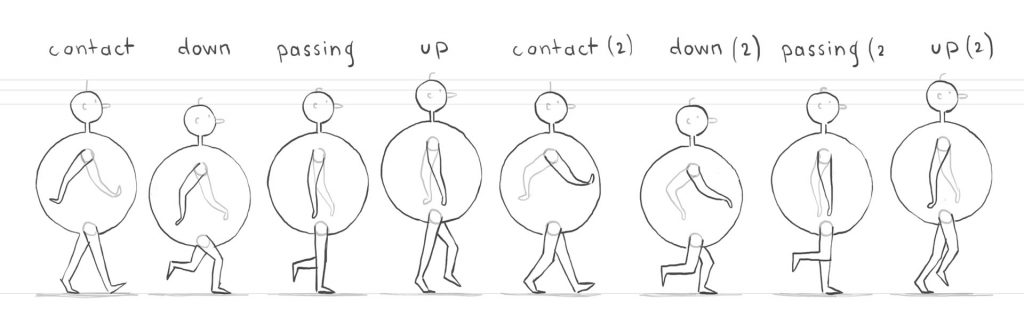
The 2D Walk Cycle
The 2D Walk Cycle
In the last week we have done some 2D work and collected some individual scenes using the Grease Pencil and even sequenced in the Video Editor – all right in Blender! We also worked with layers and fills. The workflow is different and takes some getting used to. Especially getting things the right layer.
Vocabulary Revisited: Onion Skinning – Onion skinning is a technique from 2D computer graphics that allows animators to see adjacent frames at once. That way, the animator can make decisions or edits based on how the previous frames are drawn.
Today we’ll hammer out a proper walk sequence, colorize our character and then add a bunch of modifiers to get some different effects from one basic walk cycle.
To set up the walk cycle, we only really need four poses and we will animate on the 3’s (every 3 frames) if we are working at 24 frames per second.
Frame 1, 13 & 25 same (contact pose) head is level
Frame 4 & 16 same (down pose) head is lower than level
Frame 7 & 19 same (passing pose) head is level again
Frame 10 & 22 same (up pose) head is above level
Things to try out: grease pencil modifiers, time modifiers, parallax effects through positioning in 2D workspace.
Project: Walk Cycle
Create a custom character of your own (robot, cog, eraser, pencil, flower) and ink out a nice looping walk cycle for your character. Set up your mise en scene. Animations should be at least 5 seconds in length. What about trying some parallax effects? What about overlapping and secondary action?
Filename: 2Dwalking.mp4 – Drop in the Google Classroom Dropbox
*Note – this is the only assignment besides the PSA and Skills/Design work we are doing in class this week.
This project is due on Thursday, March 5th for a showcase after English. Plenty of time to do some Instagram worthy work. Loop your animation smoothly for at least 5 seconds for a smooth walk cycle!
10:50 Morning Break (10 minutes)

11:00 Monday Mash Up – Let’s make 2D and 3D work together!

By using the grease pencil and some basic modeling we can come up with a nice blend of 2D and 3D animation. We’ll do a helicopter together taking advantage of masking in 2D for the windows and noise modifiers. We’ll model from a basic cube – I’ll supply my base model to you to speed up workflow. You’ll make the materials and 2D art. You can find it in Public Folders under Blender Resources / Models.
11:55 Lunch

12:25 Unity – Zip Town
Let’s add a couple more features to ZipTown game. Specifically we’ll look at fixing up the pickup/drop off of packages and resetting so more deliveries can be made.
To assist, we’ll be using a variable type called a bool. A bool looks to see if something is true of false.
bool imHungry

     if(imHungry == true)
        {
          EatFood();
        }
1:10 Afternoon Break
1:25 Speed Design

1:45 Independent Production & Guided Support
- PSA Facts Worksheet – Wednesday, February 18th
- 2D Animation (3 objects) – Wednesday, February 18th
- PSA Asset Modeling – Friday, February 20th
- 2D Walk Cycle – Thursday, March 5th
2:10 Dailies

2:15 Independent Reading

2:40 Dismissal
